Digital condition reports, built for your iPad.

Standardize reports for your institution. Capture findings on-site and export in one click.

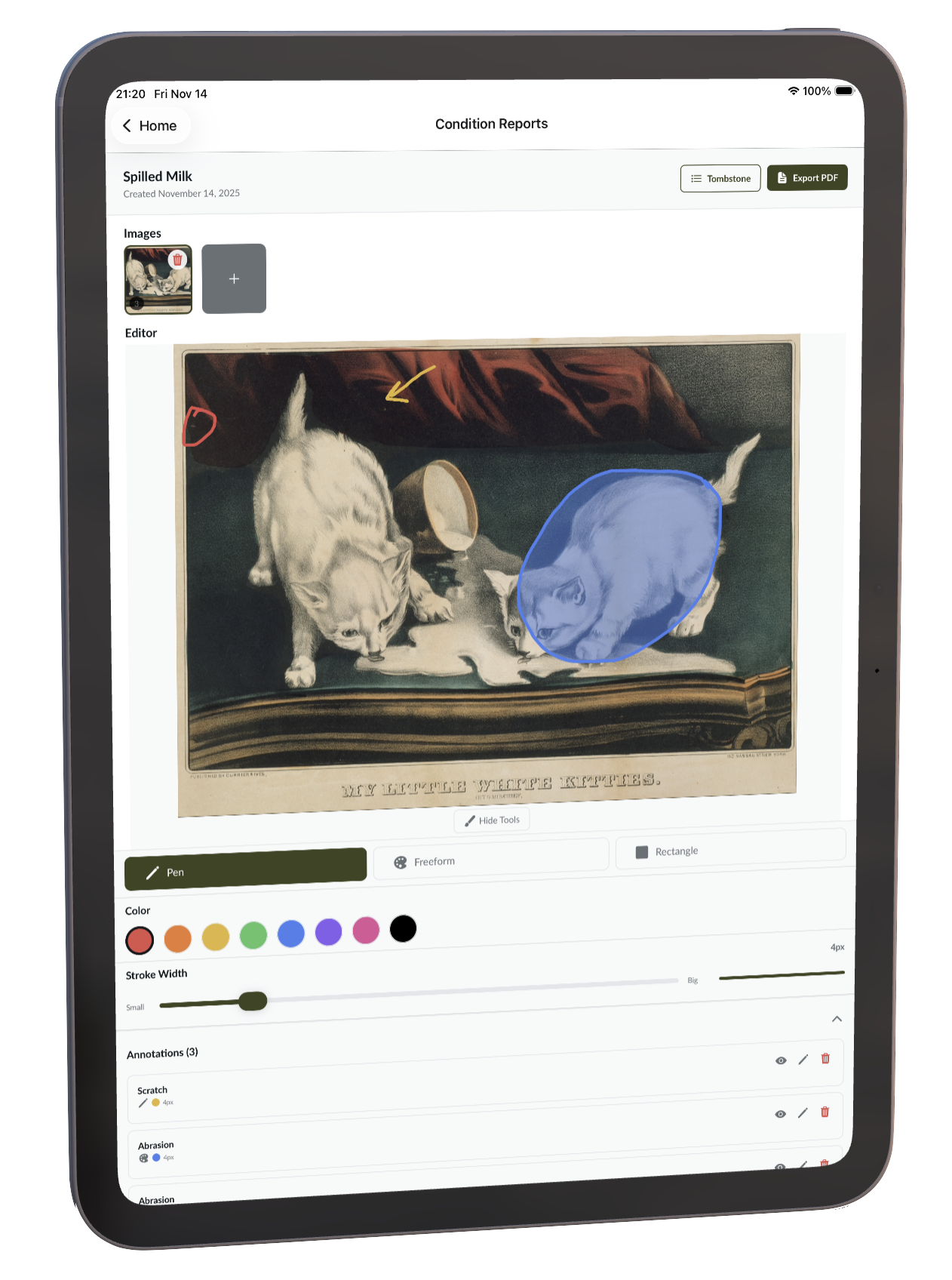
Condition Reports — Spilled Milk

Used with permission from Erik Linton

Used by collections teams

Built for museums, foundations, fine-art services, and conservation studios.

Prep object data at your desk, capture findings on-site with an iPad, keep working offline, then export PDFs or share read-only reports.

  • "Exhibii has made condition reporting faster and easier to document. I like that I can use the app on my phone as well as a tablet."

    Yoleny Martinez

    The Grace Museum

  • "[ACR] has proven to be an invaluable addition to our Collections toolkit."

    Mark Lightcap

    Mike Kelley Foundation

  • "Exhibii has revolutionized the way we manage temporary exhibitions. For our small staff it has truly streamlined one of our most important processes."

    Maury Ford

    Oklahoma City Museum of Art

The problem

Today, you have to choose between two bad options.

Option A

Pen and paper

You're shipping a literal suitcase of binders. And then 18 emails with illegible scans of all those paper docs. And every time the piece moves, you start it all over again.

Option B*

Generic software

Re-type the same fifteen fields you typed over, and over, and over, all to not even use the same terminology across your reports. Need to export all the reports? There goes your afternoon.

*There is, of course, ArtiCheck. We have a whole article comparing us to them.

Workflow

Prep at your desk. Add details on-site.

The desktop is for data and dispatch. The iPad is for the gallery floor. Switch between them — your work syncs.

Desktop for data

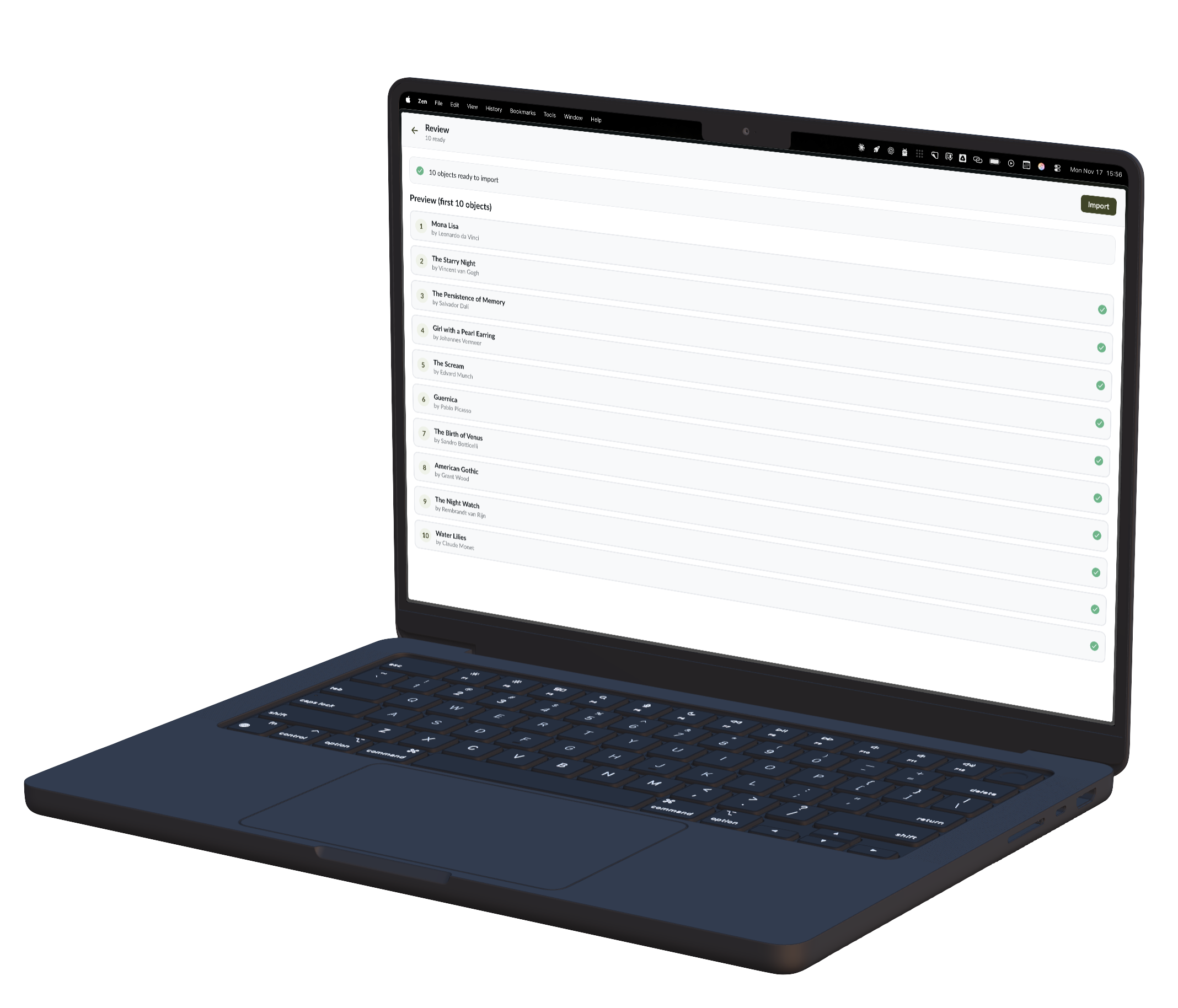
  • Import objects with our magic CSV importer
  • Attach reports to objects, before or after the import
  • Export every report or share a single link
  • Works in any modern browser
Condition Reports on the desktop
Condition Reports on iPad

Mobile for images

  • Draw the exact location of your findings
  • Snap full-resolution detail images, capture notes
  • Compile final condition reports without leaving the app
  • 100% offline-capable — we sync when you're back online

Features

Picture-first reporting

Pictures are worth a thousand words. The app encourages detailed photos of damage, alongside annotations drawn directly on the work.

Annotate on the iPad

Draw the exact location of a scratch, a chip, or a stain right on the object — full Apple Pencil support.

Configurable annotations

Define specific damage types for your institution, and enforce standardized naming conventions across reports.

Customize your tombstone info

Title, artist, accession number, medium, dimensions — pick the exact fields per object type, and every record matches your standards.

Collaborative

Everything syncs to the cloud. Share single objects or entire exhibits, And even share a report with external contacts.

Offline first

After login, the app works 100% offline. Everything syncs in the background once you're back online.

Pricing

Transparent pricing for collections teams.

Start with the plan that matches your team size. Enterprise pricing and non-profit discounts are available for institutions with custom needs.

Standard

1 seat

$50/mo

For solo registrars, conservators, or small museums moving condition reports off paper and into an offline iPad workflow.

  • Offline mobile condition reporting
  • Drawing annotations with notes and detail photos
  • PDF exports, signatures, and shareable report links

Pro

Up to 5 seats

Best fit for teams

$90/mo

For small to mid-sized collections teams coordinating condition reports across loans, exhibitions, or object-level tasks.

  • Multi-user collaboration
  • Per-object task tracking for special requests
  • Priority support for improvement and development requests

Enterprise

Custom seat counts

Custom

For museums, foundations, fine-art services, and conservation studios with broader rollout or institution-specific workflow needs.

  • Institution-specific setup
  • CSV/object catalog import support
  • Best fit for larger teams and cross-department workflows

Get started with Art Condition Reports.

Use the iPad app for on-site reporting, then open the web app for setup, imports, and sharing.

Pricing questions

Which plan fits a small museum?
Standard is the starting point when one person owns condition reporting. Pro is the better fit when several staff members, registrars, art handlers, or conservators need shared access.
Which plan fits a mid-sized collections team?
Pro fits teams that need up to five seats, collaboration, task tracking, and priority support. Enterprise is the path for more seats, custom rollout needs, or institution-specific workflows.
Are discounts available for nonprofits or beta users?
Non-profit discounts and early access discounts may be available. Book a short demo or contact the team for institution-specific pricing.

Frequently Asked Questions

Are there grants for free licenses?

We have not yet set up official grants for free licenses. We do value all institutions, and particularly those who help the next generation of collections professionals. If you are interested in discussing this further, feel free to email me at spencer@conditionreporting.com.

What does Priority support mean?

While we try to rapidly respond to all customer issues, we give extra priority to any improvements & development requests that come from our Pro users. We also guarantee an email response within 24 hours for any email sent during business hours (US hours), for our Pro users.

Does the mobile app work with no internet connection?

Yes! our condition reporting app works 100% offline. Once you've reconnected to the internet, we sync your data to the cloud in the background.

Contact Us

Get in touch with our team. We're here to help.

For institutions

Book a demo for your institution. Shape the future of condition reporting.

Walk through the workflow, ask about pricing, and get a direct line to the team.